 Gardens of AI
Non-blocking MCP Tasks with Strands Agents
This note shows how to let a Strands agent start a long-running MCP tool, do other work while the tool runs, and collect the result later.
| Package | Version |
|---|---|
strands-agents | 1.59.0 |
mcp (Python SDK) | 2.1.1 |
fastmcp / fastmcp-tasks | 4.1.0 |
| Python | 3.13 (with uv) |
The problem
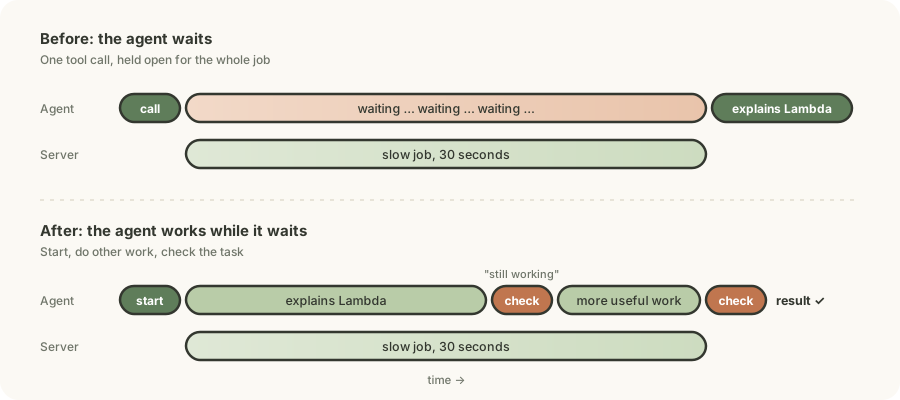
I have an MCP tool that runs for 30 seconds. I ask the agent:
Run the tool for 30 seconds, and explain AWS Lambda while it runs.
The agent does not explain Lambda while the tool runs. It waits 30 seconds, and then it answers.
What MCP Tasks are
A normal MCP tool call is one request. It stays open until the tool is done. With MCP Tasks:
- The client sends the tool call.
- The server replies at once with a task handle: a
task_idand the statusworking. - The server continues the job.
- The client polls with the
task_iduntil the status iscompleted,failedorcancelled. - The final status contains the tool result.
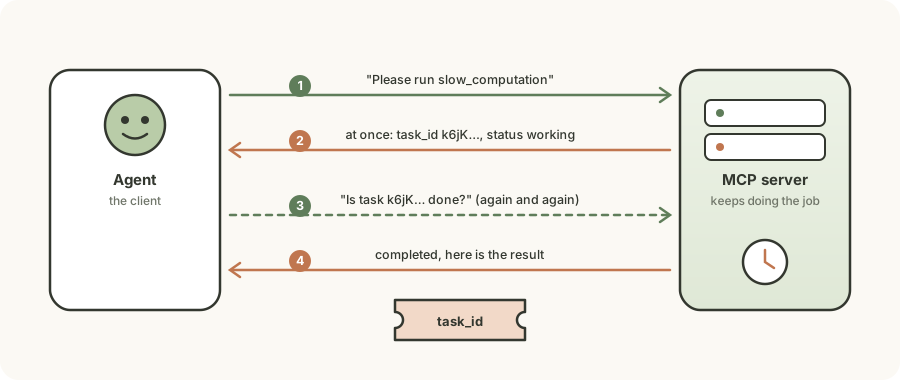
This is the asynchronous request-reply pattern. Some AWS services work the same way, for example Step Functions (StartExecution → DescribeExecution) and Textract (StartDocumentAnalysis → GetDocumentAnalysis). MCP Tasks makes it a standard, so each server does not need its own start_x / get_x API.
The MCP server
A FastMCP server with one task-enabled tool:
import asyncio
from fastmcp import FastMCP
from fastmcp_tasks import TasksExtension

mcp = FastMCP("TaskServer")
mcp.add_extension(TasksExtension())

@mcp.tool(task=True)
async def slow_computation(duration: int) -> str:
    """A long-running background operation."""
    for i in range(duration):
        await asyncio.sleep(1)
    return f"Completed in {duration} seconds"

if __name__ == "__main__":
    mcp.run()
First try: give the agent the MCP client
from mcp import stdio_client, StdioServerParameters
from strands import Agent
from strands.tools.mcp import MCPClient

mcp_client = MCPClient(
    lambda: stdio_client(
        StdioServerParameters(command="uv", args=["run", "./mcp_long_running_task.py"])
    ),
    tasks_config={},   # opt in to MCP Tasks
)

agent = Agent(tools=[mcp_client])
agent("Run your MCP tool as a task for 30 seconds, and explain AWS Lambda while it runs.")
tasks_config is opt-in
Without tasks_config, Strands makes a normal, blocking tools/call. An empty dict turns tasks on. The optional fields:
| Field | Meaning | Default |
|---|---|---|
poll_timeout | Total time to wait for the task | 5 minutes |
request_timeout | Timeout for each lifecycle request | 1 minute |
poll_interval | Poll delay if the server sends no pollIntervalMs | 1 second |
ttl | Task time-to-live (legacy 2025-11-25 flow only) | 1 minute |
With tasks on, the agent still waits
The call now goes through MCP Tasks, but the agent still waits 30 seconds. When the model calls an MCP tool, Strands runs call_tool_sync (call_tool_async inside the agent loop). That method does both halves of the pattern:
model calls slow_computation
  └─ Strands: call_tool_sync
       ├─ submit → server returns task_id at once
       └─ poll... poll... poll... (30 s)    ← Strands waits here
  └─ result goes back to the model
The poll loop is inside the tool call. The model sees one call that takes 30 seconds.
So built-in task support makes long calls reliable, not non-blocking:
- Every request is short. This avoids proxy, load balancer and client read timeouts (for example, the API Gateway default of 29 seconds).
- A job can run for 20 minutes while each HTTP call stays short.
- The server owns the job, so it can queue it, persist it or hand it to a worker.
- Statuses and cancel are standard.
These gains matter most for remote HTTP MCP servers. With a local stdio subprocess, as here, there is almost no difference.
The lower-level client methods
MCPClient has methods that are not in the Strands user guide yet. The docstrings are in strands/tools/mcp/mcp_client.py:
| Method | What it does |
|---|---|
call_tool_sync | Submit and poll until done. Returns the final result. The agent uses this. |
submit_tool_sync | Submit once and return at once. No polling. Returns a task handle or a direct result. |
get_task_sync(task_id) | One status check. |
cancel_task_sync(task_id) | Cancel the task. |
Test 1: does the server reply at once?
Before I change the agent, I want to prove that the server does not block. So I call the tool directly from Python, with no agent and no model. I use submit_tool_sync, because it sends the request and does not wait for the job.
with mcp_client:
    result = mcp_client.submit_tool_sync("slow_computation", {"duration": 10})
    print(result)
The call returns in milliseconds, while the job is still running on the server:
task_id='k6jKbLsd...' status='working' status_message=None
created_at='2026-10-12T12:43:58...' ttl_ms=900000 poll_interval_ms=5000 result_type='task'| Field | Meaning |
|---|---|
result_type='task' | The server sent a task, not a finished result. |
task_id | Use it for all later calls. |
status='working' | The job is running. |
poll_interval_ms=5000 | The server's advice: check every 5 seconds. |
ttl_ms=900000 | The server keeps the result for 15 minutes. |
So the protocol does not block. Only the Strands helper call_tool_sync blocks, because it polls for you. If I can do the polling myself, I can decide what happens between polls.
Test 2: can I collect the result later?
Now I have a task_id, but not the result. This test proves that I can get the result with separate, short status checks. It does the same work as call_tool_sync, but the loop is in my code, so I can see each step.
The code submits the job, then checks the status every 2 seconds. Each check is one short request. When the status is no longer working, it prints the result.
import time

with mcp_client:
    result = mcp_client.submit_tool_sync("slow_computation", {"duration": 10})
    task_id = result.task_id

    while True:
        status = mcp_client.get_task_sync(task_id)
        print(status.status, status.status_message)
        if status.status != "working":
            break
        time.sleep(2)

    print("FINAL:", status.result.content[0].text)   # "Completed in 10 seconds"
The output shows working a few times, then completed, then the tool's answer. The answer is on status.result, as a normal CallToolResult.
This loop is the important part. A Python while loop is the wrong place for it, because nothing else can happen while it runs. In the next step I give the loop to the model. Each status check becomes a tool call, and the model can do other work between checks.
Move the loop into the agent
The model cannot run a while loop. It can only call tools. So split the pattern into two tools, and let the model decide when to poll:
from mcp import stdio_client, StdioServerParameters
from strands import Agent, tool
from strands.tools.mcp import MCPClient

mcp_client = MCPClient(
    lambda: stdio_client(
        StdioServerParameters(command="uv", args=["run", "./mcp_long_running_task.py"])
    ),
    tasks_config={},
)

@tool
def start_slow_computation(duration: int) -> str:
    """Start a slow computation in the background. Returns a task_id at once.
    The job keeps running. Use check_task with the task_id to get the result later.

    Args:
        duration: How many seconds the job runs.
    """
    handle = mcp_client.submit_tool_sync("slow_computation", {"duration": duration})
    return f"Task started. task_id={handle.task_id}"

@tool
def check_task(task_id: str) -> str:
    """Check a background task. Returns 'working' if it is not done,
    or the final result if it is done.

    Args:
        task_id: The id that start_slow_computation returned.
    """
    status = mcp_client.get_task_sync(task_id)
    if status.status == "working":
        return "Still working. Do other useful work, then check again."
    if status.status == "completed":
        return f"Done: {status.result.content[0].text}"
    return f"Task ended with status {status.status}: {status.status_message}"

# The agent gets only the wrappers, so we keep the client open ourselves.
with mcp_client:
    agent = Agent(tools=[start_slow_computation, check_task])
    agent(
        "Start the slow computation for 30 seconds. "
        "While it runs, explain AWS Lambda. "
        "Then check the task and tell me the result."
    )
The flow now:
model calls start_slow_computation
  └─ submit_tool_sync → task_id returns in milliseconds
model explains AWS Lambda (the server is still working)
model calls check_task → "Still working..."
model calls check_task → "Done: Completed in 30 seconds"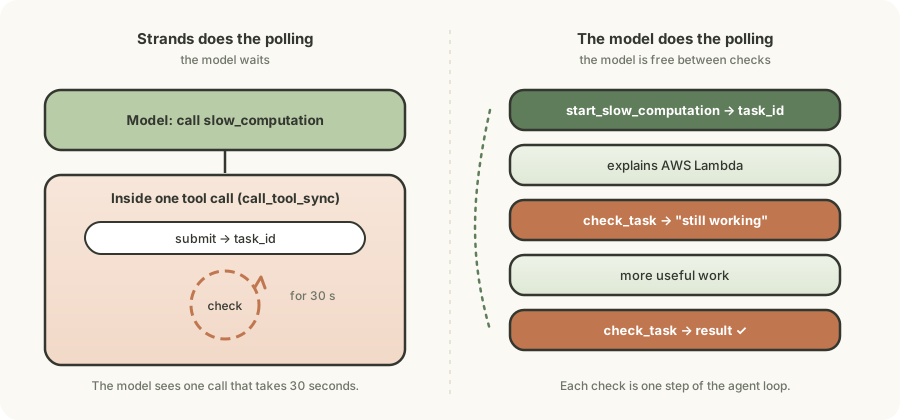
Why the wrappers work
The MCP server does not change. The wrappers only choose which client method runs. If you give the agent the MCP client, the model sees slow_computation, and that always goes through the blocking call_tool_sync.
Notes
- The docstring is the prompt. Strands sends the name, docstring and
Argsto the model. "Use check_task ... later" teaches it the two steps. - Give the agent only the wrappers. If you also pass
mcp_client, the model can choose the blockingslow_computation. submit_tool_syncdoes not always return a task. The return type isMCPCallToolResult | MCPCreateTaskResult. Checkhandle.result_type == "task"before you readhandle.task_id.- Fast polling. The model can call
check_taskmany times in a row. Sleep briefly when the status isworking, or usepoll_interval_ms. - Docs. See
TasksConfiginstrands/tools/mcp/mcp_tasks.py, the docstrings inmcp_client.py,https://strandsagents.com/llms-full.txt, and thestrands-agents/sdk-pythonrelease notes.
Summary
| Approach | Agent blocks? | Uses MCP Tasks? | Good for |
|---|---|---|---|
MCP client, no tasks_config | Yes | No | Short tools |
MCP client + tasks_config | Yes | Yes (Strands polls) | Long jobs that must be reliable |
@tool wrappers on submit_tool_sync / get_task_sync | No | Yes (the agent polls) | Long jobs where the agent must do other work |
MCP Tasks lets the server reply at once with a task_id. Strands gives you the low-level methods to check it. The wrappers let the model do the checking, so it can work while the job runs.
Comments and feedback
Comments use GitHub Discussions. You need a GitHub account to post.